proposal/design/en/imagehub.md
Based on kubernetes CRD, imagehub is application on sealos cloud to manage and display cluster images information.
imagehub has 4 types CRD.
Image will be generated from user image's readme file and will be automatically applied by sealos to imagehub CRD when user pushing cluster image to sealos registry so that imagehub can display these information in sealos cloud.
Image's owner is being set to the repository for garbage collection.
Image CRD has these elements:
Here is an image cr example:
apiVersion: imagehub.sealos.io/v1
kind: Image
metadata:
labels:
organization.imagehub.sealos.io: labring
repository.imagehub.sealos.io: cert-manager
tag.imagehub.sealos.io: v1.8.0
name: labring.cert.manager.v1.8.0
spec:
detail:
ID: Unknown
arch: Unknown
description: Cloud native certificate management. X.509 certificate management
for Kubernetes and OpenShift
docs: |
# cert-manager
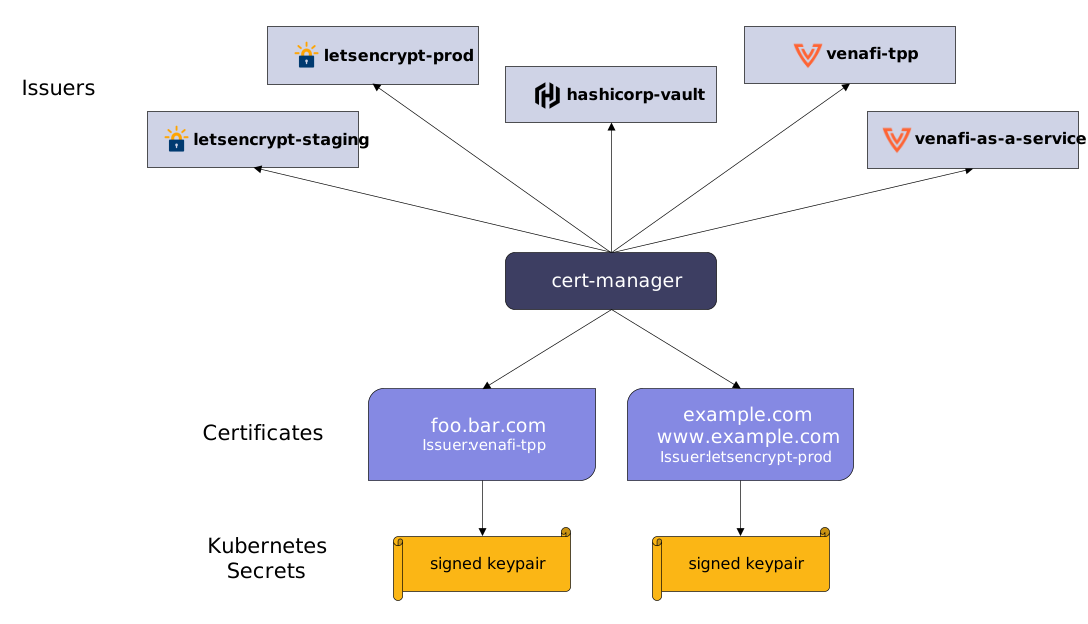
cert-manager adds certificates and certificate issuers as resource types in Kubernetes clusters, and simplifies the process of obtaining, renewing and using those certificates.
It supports issuing certificates from a variety of sources, including Let's Encrypt (ACME), HashiCorp Vault, and Venafi TPP / TLS Protect Cloud, as well as local in-cluster issuance.
cert-manager also ensures certificates remain valid and up to date, attempting to renew certificates at an appropriate time before expiry to reduce the risk of outages and remove toil.
## Documentation
Documentation for cert-manager can be found at [cert-manager.io](https://cert-manager.io/docs/).
For the common use-case of automatically issuing TLS certificates for
Ingress resources, see the [cert-manager nginx-ingress quick start guide](https://cert-manager.io/docs/tutorials/acme/nginx-ingress/).
For a more compressive guide to issuing your first certificate, see our [getting started guide](https://cert-manager.io/docs/getting-started/).
icon: https://cert-manager.io/images/cert-manager-logo-icon.svg
keywords:
- Storage
name: labring/cert-manager:v1.8.0
Notice that some information in detail info is generated by sealos when pushing image to sealos
registry: hub.sealos.cn, such as image hash, name, arch, etc...
Repository is automatically generated after image cr creation, short name is repo, and its owner is the organization.
Repository maintain image's common information and provide batter authority management in the future.
Repository CRD has these element:
Here is a repository cr example:
apiVersion: imagehub.sealos.io/v1
kind: Repository
metadata:
  labels:
    keyword.imagehub.sealos.io/Storage: ""
    organization.imagehub.sealos.io: labring
    repository.imagehub.sealos.io: cert-manager
  name: labring.cert-manager
spec:
  name: labring/cert-manager
status:
  latestTag:
    creatTime: "2022-12-27T07:33:08Z"
    metaName: labring.cert.manager.v1.8.0
    name: v1.8.0
  tags:
    - creatTime: "2022-12-27T07:37:34Z"
      metaName: labring.cert.manager.v1.7.0
      name: v1.7.0
    - creatTime: "2022-12-27T07:33:08Z"
      metaName: labring.cert.manager.v1.8.0
      name: v1.8.0
Notice that you don't need to create/update repository
Organization CRD provide user a way to assess sealos registry. User can create organization and push image to it.
Here is an example:
apiVersion: imagehub.sealos.io/v1
kind: Organization
metadata:
  name: organization-name
spec:
  name: organization-name
  creator: your-user-uuid
  manager: [ your-user-uuid ]
You can leave creator and manager as empty, because creator uuid is automatically added.
Notice that organization is unique in sealos cloud, and its name is case sensitivity
Datapack provide data construct and package ability. It is not convenient to use kubernetes CRD directly, so we design datapack CRD to package data from different CRD with different information granularity.
See datapack design for more information
Datapack Usage
There is two steps you need to do.
apiVersion: imagehub.sealos.io/v1
kind: DataPack
metadata:
  name: datapackuid
spec:
  expireTime: 120m
  names:
    - labring/cert-manager:v1.8.0
  type: detail
apiVersion: imagehub.sealos.io/v1
kind: DataPack
metadata:
  name: datapackuid
spec:
  expireTime: 120m
  names:
    - labring/cert-manager:v1.8.0
  type: detail
status:
  codes: 1
  datas:
    labring/cert-manager:v1.8.0:
      ID: Unknown
      arch: Unknown
      description: Cloud native certificate management. X.509 certificate management
        for Kubernetes and OpenShift
      docs: |
      icon: https://cert-manager.io/images/cert-manager-logo-icon.svg
      keywords:
        - Storage
      name: labring/cert-manager:v1.8.0
      tags:
        - creatTime: "2022-12-27T07:37:34Z"
          metaName: labring.cert.manager.v1.7.0
          name: v1.7.0
        - creatTime: "2022-12-27T07:33:08Z"
          metaName: labring.cert.manager.v1.8.0
          name: v1.8.0
Notice that datapack cr will be expired and will be deleted after its expiration.
There are three parts of authority management.
Organization authority management is based on kubernetes rbac, a clusterrole and clusterrolebinding will be created for authority management when organization reconciling.
Repository and image authority management is based on webhook. When user wants to create/update repository/image, Validate webhook will check if user is one of the organization.spec.manager.
Registry authority management is based on organization CRD. When user push/pull image from the registry, registry auth server will use the organization CRD to check if user have the authority to push/pull image.
sealos cli have some changes to make it convenient for user to use imagehub and sealos registry.
-k, means use kubeconfig to log in to the registry.