docs/source/polars-cloud/providers/aws/infra.md
Polars Cloud manages the hardware for you by spinning up and down raw EC2 instances. In order to do
this it needs permissions in your own cloud environment. None of the resources below have costs
associated with them. While no compute clusters are running Polars Cloud will not create any AWS
costs. The recommended way of doing this is running pc setup.
When you deploy Polars Cloud the following infrastructure is setup.
<figure markdown="span"> 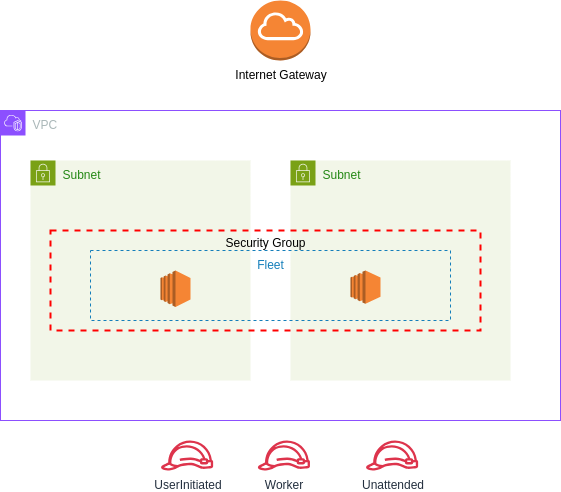 </figure>VPC and two subnets in which Polars EC2 workers can run.security groups. One for the default mode that allows direct communication between your
local environment and the cluster, and one for proxy mode, which does not have any public ports.PolarsWorker IAM role. Polars EC2 workers run under this IAM role.UserInitiated & Unattended IAM role. The UserInitiated role has the permissions to start
Polars EC2 workers in your environment. The Unattended role can terminate unused compute
clusters that you might have forgot about.By design Polars Cloud never has access to the data inside your cloud environment. The data never leaves your environment.
The list below show an overview of the required permissions for each of the roles.
??? User Initiated
- ec2:CreateTags
- ec2:RunInstances
- ec2:DescribeInstances
- ec2:DescribeInstanceTypeOfferings
- ec2:DescribeInstanceTypes
- ec2:TerminateInstances
- ec2:CreateFleet
- ec2:CreateLaunchTemplate
- ec2:CreateLaunchTemplateVersion
- ec2:DescribeLaunchTemplates
??? Unattended
- ec2:DescribeInstances
- ec2:TerminateInstances
- ec2:DescribeFleets
- ec2:DeleteLaunchTemplate
- ec2:DeleteLaunchTemplateVersions
- ec2:DeleteFleets
- sts:GetCallerIdentity
- sts:TagSession
??? Worker
- s3:PutObject
- s3:GetObject
- s3:ListBucket
The permissions of the worker role and S3 access can be scoped to certain buckets, by adjusting the role within AWS.
By default, Polars Cloud is deployed within its own dedicated network (including VPC, subnets, and related resources). However, you can choose to use your own network configuration by selecting the "Deploy with custom template" option. This allows you to deploy into an existing VPC and subnets of your choice.
You can configure these subnets to align with your business requirements. By default, the Python client accessing Polars Cloud must have access, so the subnet must be public, but allows for access controls such as IP-whitelisting. For proxy mode, outbound traffic must be allowed.
Depending on your enterprise needs or existing infrastructure, you may not require certain components (e.g. VPC, subnet) of the default setup of Polars Cloud. Or you have additional security requirements in place. Together with our team of engineers we can integrate Polars Cloud with your existing infrastructure. Please contact us directly.