docs/en/observability/portkey.mdx
Portkey enhances CrewAI with production-readiness features, turning your experimental agent crews into robust systems by providing:
from crewai import LLM
from portkey_ai import createHeaders, PORTKEY_GATEWAY_URL

# Create an LLM instance with Portkey integration
gpt_llm = LLM(
    model="gpt-4o",
    base_url=PORTKEY_GATEWAY_URL,
    api_key="dummy",  # We are using a Virtual key, so this is a placeholder
    extra_headers=createHeaders(
        api_key="YOUR_PORTKEY_API_KEY",
        virtual_key="YOUR_LLM_VIRTUAL_KEY",
        trace_id="unique-trace-id",               # Optional, for request tracing
    )
)

#Use them in your Crew Agents like this:

	@agent
	def lead_market_analyst(self) -> Agent:
		return Agent(
			config=self.agents_config['lead_market_analyst'],
			verbose=True,
			memory=False,
			llm=gpt_llm
		)
Portkey provides comprehensive observability for your CrewAI agents, helping you understand exactly what's happening during each execution.
<Tabs> <Tab title="Traces"> <Frame> </Frame>Traces provide a hierarchical view of your crew's execution, showing the sequence of LLM calls, tool invocations, and state transitions.
# Add trace_id to enable hierarchical tracing in Portkey
portkey_llm = LLM(
    model="gpt-4o",
    base_url=PORTKEY_GATEWAY_URL,
    api_key="dummy",
    extra_headers=createHeaders(
        api_key="YOUR_PORTKEY_API_KEY",
        virtual_key="YOUR_OPENAI_VIRTUAL_KEY",
        trace_id="unique-session-id"  # Add unique trace ID
    )
)
Portkey logs every interaction with LLMs, including:
All logs can be filtered by metadata, trace IDs, models, and more, making it easy to debug specific crew runs. </Tab>
<Tab title="Metrics & Dashboards"> <Frame> </Frame>Portkey provides built-in dashboards that help you:
You can filter and segment all metrics by custom metadata to analyze specific crew types, user groups, or use cases. </Tab>
<Tab title="Metadata Filtering"> <Frame> </Frame>Add custom metadata to your CrewAI LLM configuration to enable powerful filtering and segmentation:
portkey_llm = LLM(
    model="gpt-4o",
    base_url=PORTKEY_GATEWAY_URL,
    api_key="dummy",
    extra_headers=createHeaders(
        api_key="YOUR_PORTKEY_API_KEY",
        virtual_key="YOUR_OPENAI_VIRTUAL_KEY",
        metadata={
            "crew_type": "research_crew",
            "environment": "production",
            "_user": "user_123",   # Special _user field for user analytics
            "request_source": "mobile_app"
        }
    )
)
This metadata can be used to filter logs, traces, and metrics on the Portkey dashboard, allowing you to analyze specific crew runs, users, or environments. </Tab> </Tabs>
When running crews in production, things can go wrong - API rate limits, network issues, or provider outages. Portkey's reliability features ensure your agents keep running smoothly even when problems occur.
It's simple to enable fallback in your CrewAI setup by using a Portkey Config:
from crewai import LLM
from portkey_ai import createHeaders, PORTKEY_GATEWAY_URL

# Create LLM with fallback configuration
portkey_llm = LLM(
    model="gpt-4o",
    max_tokens=1000,
    base_url=PORTKEY_GATEWAY_URL,
    api_key="dummy",
    extra_headers=createHeaders(
        api_key="YOUR_PORTKEY_API_KEY",
        config={
            "strategy": {
                "mode": "fallback"
            },
            "targets": [
                {
                    "provider": "openai",
                    "api_key": "YOUR_OPENAI_API_KEY",
                    "override_params": {"model": "gpt-4o"}
                },
                {
                    "provider": "anthropic",
                    "api_key": "YOUR_ANTHROPIC_API_KEY",
                    "override_params": {"model": "claude-3-opus-20240229"}
                }
            ]
        }
    )
)

# Use this LLM configuration with your agents
This configuration will automatically try Claude if the GPT-4o request fails, ensuring your crew can continue operating.
<CardGroup cols="2"> <Card title="Automatic Retries" icon="rotate" href="https://portkey.ai/docs/product/ai-gateway/automatic-retries"> Handles temporary failures automatically. If an LLM call fails, Portkey will retry the same request for the specified number of times - perfect for rate limits or network blips. </Card> <Card title="Request Timeouts" icon="clock" href="https://portkey.ai/docs/product/ai-gateway/request-timeouts"> Prevent your agents from hanging. Set timeouts to ensure you get responses (or can fail gracefully) within your required timeframes. </Card> <Card title="Conditional Routing" icon="route" href="https://portkey.ai/docs/product/ai-gateway/conditional-routing"> Send different requests to different providers. Route complex reasoning to GPT-4, creative tasks to Claude, and quick responses to Gemini based on your needs. </Card> <Card title="Fallbacks" icon="shield" href="https://portkey.ai/docs/product/ai-gateway/fallbacks"> Keep running even if your primary provider fails. Automatically switch to backup providers to maintain availability. </Card> <Card title="Load Balancing" icon="scale-balanced" href="https://portkey.ai/docs/product/ai-gateway/load-balancing"> Spread requests across multiple API keys or providers. Great for high-volume crew operations and staying within rate limits. </Card> </CardGroup>Portkey's Prompt Engineering Studio helps you create, manage, and optimize the prompts used in your CrewAI agents. Instead of hardcoding prompts or instructions, use Portkey's prompt rendering API to dynamically fetch and apply your versioned prompts.
<Frame caption="Manage prompts in Portkey's Prompt Library"> 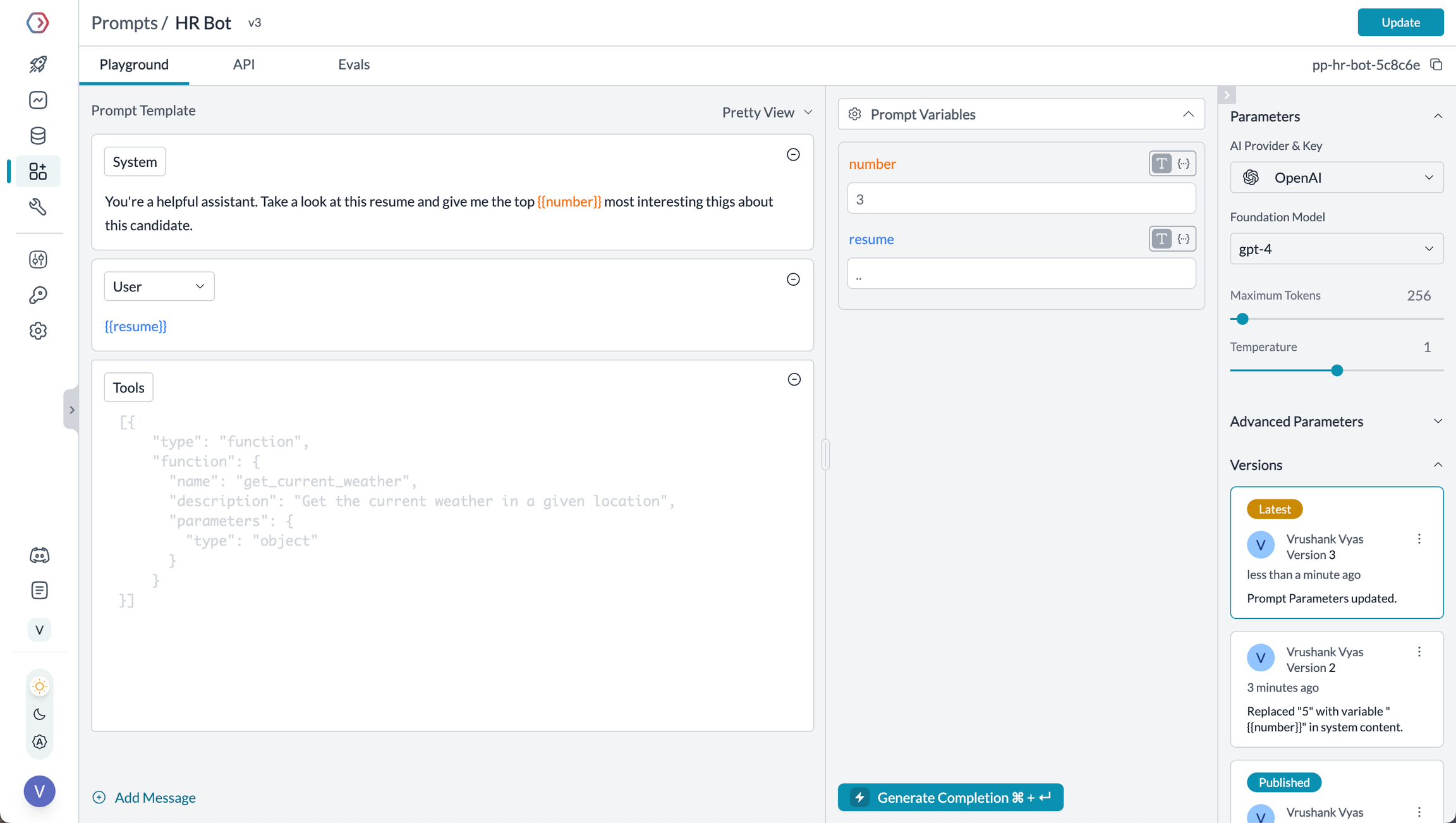 </Frame> <Tabs> <Tab title="Prompt Playground"> Prompt Playground is a place to compare, test and deploy perfect prompts for your AI application. It's where you experiment with different models, test variables, compare outputs, and refine your prompt engineering strategy before deploying to production. It allows you to:This visual environment makes it easier to craft effective prompts for each step in your CrewAI agents' workflow. </Tab>
<Tab title="Using Prompt Templates"> The Prompt Render API retrieves your prompt templates with all parameters configured:from crewai import Agent, LLM
from portkey_ai import createHeaders, PORTKEY_GATEWAY_URL, Portkey
# Initialize Portkey admin client
portkey_admin = Portkey(api_key="YOUR_PORTKEY_API_KEY")
# Retrieve prompt using the render API
prompt_data = portkey_client.prompts.render(
prompt_id="YOUR_PROMPT_ID",
variables={
"agent_role": "Senior Research Scientist",
}
)
backstory_agent_prompt=prompt_data.data.messages[0]["content"]
# Set up LLM with Portkey integration
portkey_llm = LLM(
model="gpt-4o",
base_url=PORTKEY_GATEWAY_URL,
api_key="dummy",
extra_headers=createHeaders(
api_key="YOUR_PORTKEY_API_KEY",
virtual_key="YOUR_OPENAI_VIRTUAL_KEY"
)
)
# Create agent using the rendered prompt
researcher = Agent(
role="Senior Research Scientist",
goal="Discover groundbreaking insights about the assigned topic",
backstory=backstory_agent, # Use the rendered prompt
verbose=True,
llm=portkey_llm
)
# Use a specific prompt version
prompt_data = portkey_admin.prompts.render(
    prompt_id="YOUR_PROMPT_ID@version_number",
    variables={
        "agent_role": "Senior Research Scientist",
        "agent_goal": "Discover groundbreaking insights"
    }
)
You are a {{agent_role}} with expertise in {{domain}}.

Your mission is to {{agent_goal}} by leveraging your knowledge
and experience in the field.

Always maintain a {{tone}} tone and focus on providing {{focus_area}}.
When rendering, simply pass the variables:
prompt_data = portkey_admin.prompts.render(
    prompt_id="YOUR_PROMPT_ID",
    variables={
        "agent_role": "Senior Research Scientist",
        "domain": "artificial intelligence",
        "agent_goal": "discover groundbreaking insights",
        "tone": "professional",
        "focus_area": "practical applications"
    }
)
Guardrails ensure your CrewAI agents operate safely and respond appropriately in all situations.
Why Use Guardrails?
CrewAI agents can experience various failure modes:
Portkey's guardrails add protections for both inputs and outputs.
Implementing Guardrails
from crewai import Agent, LLM
from portkey_ai import createHeaders, PORTKEY_GATEWAY_URL

# Create LLM with guardrails
portkey_llm = LLM(
    model="gpt-4o",
    base_url=PORTKEY_GATEWAY_URL,
    api_key="dummy",
    extra_headers=createHeaders(
        api_key="YOUR_PORTKEY_API_KEY",
        virtual_key="YOUR_OPENAI_VIRTUAL_KEY",
        config={
            "input_guardrails": ["guardrails-id-xxx", "guardrails-id-yyy"],
            "output_guardrails": ["guardrails-id-zzz"]
        }
    )
)

# Create agent with guardrailed LLM
researcher = Agent(
    role="Senior Research Scientist",
    goal="Discover groundbreaking insights about the assigned topic",
    backstory="You are an expert researcher with deep domain knowledge.",
    verbose=True,
    llm=portkey_llm
)
Portkey's guardrails can:
Track individual users through your CrewAI agents using Portkey's metadata system.
What is Metadata in Portkey?
Metadata allows you to associate custom data with each request, enabling filtering, segmentation, and analytics. The special _user field is specifically designed for user tracking.
from crewai import Agent, LLM
from portkey_ai import createHeaders, PORTKEY_GATEWAY_URL

# Configure LLM with user tracking
portkey_llm = LLM(
    model="gpt-4o",
    base_url=PORTKEY_GATEWAY_URL,
    api_key="dummy",
    extra_headers=createHeaders(
        api_key="YOUR_PORTKEY_API_KEY",
        virtual_key="YOUR_OPENAI_VIRTUAL_KEY",
        metadata={
            "_user": "user_123",  # Special _user field for user analytics
            "user_tier": "premium",
            "user_company": "Acme Corp",
            "session_id": "abc-123"
        }
    )
)

# Create agent with tracked LLM
researcher = Agent(
    role="Senior Research Scientist",
    goal="Discover groundbreaking insights about the assigned topic",
    backstory="You are an expert researcher with deep domain knowledge.",
    verbose=True,
    llm=portkey_llm
)
Filter Analytics by User
With metadata in place, you can filter analytics by user and analyze performance metrics on a per-user basis:
<Frame caption="Filter analytics by user"> </Frame>This enables:
Implement caching to make your CrewAI agents more efficient and cost-effective:
<Tabs> <Tab title="Simple Caching"> ```python from crewai import Agent, LLM from portkey_ai import createHeaders, PORTKEY_GATEWAY_URLportkey_llm = LLM( model="gpt-4o", base_url=PORTKEY_GATEWAY_URL, api_key="dummy", extra_headers=createHeaders( api_key="YOUR_PORTKEY_API_KEY", virtual_key="YOUR_OPENAI_VIRTUAL_KEY", config={ "cache": { "mode": "simple" } } ) )
researcher = Agent( role="Senior Research Scientist", goal="Discover groundbreaking insights about the assigned topic", backstory="You are an expert researcher with deep domain knowledge.", verbose=True, llm=portkey_llm )
Simple caching performs exact matches on input prompts, caching identical requests to avoid redundant model executions.
  </Tab>

  <Tab title="Semantic Caching">
```python
from crewai import Agent, LLM
from portkey_ai import createHeaders, PORTKEY_GATEWAY_URL

# Configure LLM with semantic caching
portkey_llm = LLM(
    model="gpt-4o",
    base_url=PORTKEY_GATEWAY_URL,
    api_key="dummy",
    extra_headers=createHeaders(
        api_key="YOUR_PORTKEY_API_KEY",
        virtual_key="YOUR_OPENAI_VIRTUAL_KEY",
        config={
            "cache": {
                "mode": "semantic"
            }
        }
    )
)

# Create agent with semantically cached LLM
researcher = Agent(
    role="Senior Research Scientist",
    goal="Discover groundbreaking insights about the assigned topic",
    backstory="You are an expert researcher with deep domain knowledge.",
    verbose=True,
    llm=portkey_llm
)
Semantic caching considers the contextual similarity between input requests, caching responses for semantically similar inputs. </Tab> </Tabs>
CrewAI supports multiple LLM providers, and Portkey extends this capability by providing access to over 200 LLMs through a unified interface. You can easily switch between different models without changing your core agent logic:
from crewai import Agent, LLM
from portkey_ai import createHeaders, PORTKEY_GATEWAY_URL

# Set up LLMs with different providers
openai_llm = LLM(
    model="gpt-4o",
    base_url=PORTKEY_GATEWAY_URL,
    api_key="dummy",
    extra_headers=createHeaders(
        api_key="YOUR_PORTKEY_API_KEY",
        virtual_key="YOUR_OPENAI_VIRTUAL_KEY"
    )
)

anthropic_llm = LLM(
    model="claude-3-5-sonnet-latest",
    max_tokens=1000,
    base_url=PORTKEY_GATEWAY_URL,
    api_key="dummy",
    extra_headers=createHeaders(
        api_key="YOUR_PORTKEY_API_KEY",
        virtual_key="YOUR_ANTHROPIC_VIRTUAL_KEY"
    )
)

# Choose which LLM to use for each agent based on your needs
researcher = Agent(
    role="Senior Research Scientist",
    goal="Discover groundbreaking insights about the assigned topic",
    backstory="You are an expert researcher with deep domain knowledge.",
    verbose=True,
    llm=openai_llm  # Use anthropic_llm for Anthropic
)
Portkey provides access to LLMs from providers including:
Why Enterprise Governance? If you are using CrewAI inside your organization, you need to consider several governance aspects:
Portkey adds a comprehensive governance layer to address these enterprise needs. Let's implement these controls step by step.
<Steps> <Step title="Create Virtual Key"> Virtual Keys are Portkey's secure way to manage your LLM provider API keys. They provide essential controls like: - Budget limits for API usage - Rate limiting capabilities - Secure API key storageTo create a virtual key: Go to Virtual Keys in the Portkey App. Save and copy the virtual key ID
<Frame> </Frame> <Note> Save your virtual key ID - you'll need it for the next step. </Note> </Step> <Step title="Create Default Config"> Configs in Portkey define how your requests are routed, with features like advanced routing, fallbacks, and retries.To create your config:
{
    "virtual_key": "YOUR_VIRTUAL_KEY_FROM_STEP1",
   	"override_params": {
      "model": "gpt-4o" // Your preferred model name
    }
}
Step 2from crewai import Agent, LLM
from portkey_ai import PORTKEY_GATEWAY_URL
# Configure LLM with your API key
portkey_llm = LLM(
model="gpt-4o",
base_url=PORTKEY_GATEWAY_URL,
api_key="YOUR_PORTKEY_API_KEY"
)
# Create agent with Portkey-enabled LLM
researcher = Agent(
role="Senior Research Scientist",
goal="Discover groundbreaking insights about the assigned topic",
backstory="You are an expert researcher with deep domain knowledge.",
verbose=True,
llm=portkey_llm
)
Virtual Keys enable granular control over LLM access at the team/department level. This helps you:
As your AI usage scales, controlling which teams can access specific models becomes crucial. Portkey Configs provide this control layer with features like:
Here's a basic configuration to route requests to OpenAI, specifically using GPT-4o:
{
	"strategy": {
		"mode": "single"
	},
	"targets": [
		{
			"virtual_key": "YOUR_OPENAI_VIRTUAL_KEY",
			"override_params": {
				"model": "gpt-4o"
			}
		}
	]
}
Create your config on the Configs page in your Portkey dashboard.
<Note>
Configs can be updated anytime to adjust controls without affecting running applications.
</Note>
Create User-specific API keys that automatically:
- Track usage per user/team with the help of virtual keys
- Apply appropriate configs to route requests
- Collect relevant metadata to filter logs
- Enforce access permissions

Create API keys through the [Portkey App](https://app.portkey.ai/)

Example using Python SDK:
```python
from portkey_ai import Portkey

portkey = Portkey(api_key="YOUR_ADMIN_API_KEY")

api_key = portkey.api_keys.create(
    name="engineering-team",
    type="organisation",
    workspace_id="YOUR_WORKSPACE_ID",
    defaults={
        "config_id": "your-config-id",
        "metadata": {
            "environment": "production",
            "department": "engineering"
        }
    },
    scopes=["logs.view", "configs.read"]
)
```

For detailed key management instructions, see the [Portkey documentation](https://portkey.ai/docs).
Monitor usage in Portkey dashboard:
- Cost tracking by department
- Model usage patterns
- Request volumes
- Error rates